

A paging system delivers spoken instructions, alerts and operational announcements to people across a building or site. The right choice depends on more than speaker power or device price: buyers need to establish who can announce to which zones, whether messages will remain intelligible in actual noise conditions, how the system interacts with existing telephones and alarms, and what happens when a network link or power source fails.
For routine announcements, a basic public address (PA) system may be sufficient. Multi-building facilities may benefit from network-based paging, while existing VoIP installations can use compatible SIP endpoints or paging gateways. A paging system intended for regulated fire evacuation is a different procurement category: suitable control equipment, loudspeakers, supervision and approval must be determined under the codes applicable to that site. The following seven checks help separate these requirements before comparing quotations.
Step 1: Define the Paging Use Case and Site Conditions
Start by listing the messages that must be delivered, the people who will initiate them and the areas that must receive them. A retail announcement, a factory shift instruction and an emergency evacuation message can have very different coverage, supervision and authorization requirements. Do not begin with a speaker model before the operational purpose is defined.
Separate everyday paging from safety-critical communication
Routine paging typically involves live announcements, scheduled messages or local operational notices. Emergency paging adds requirements for message priority, authorized access, alarm initiation, manual intervention and recovery after faults. A telephone-triggered announcement does not, by itself, make the underlying system a compliant fire voice-alarm installation.
Define whether the organization requires one-way announcements, two-way help-point communication or both. SIP intercoms and industrial telephones provide a return communication path only where the installed endpoints, call routing and operator workflow support it; loudspeakers alone do not provide talk-back capability.
Document the physical environment
| Site or area | Typical paging need | What to verify before selection |
|---|---|---|
| Offices, schools and healthcare corridors | Clear, controlled local announcements | Room acoustics, quiet-zone rules, discreet mounting and authorized paging groups |
| Factories and warehouses | Instructions audible around equipment and moving staff | Background noise, hearing protection, coverage geometry and speaker mounting |
| Outdoor yards, ports and tunnels | Weather-exposed or long-distance announcements | Ingress protection, corrosion, wind, reverberation, surge protection and maintainability |
| Transport stations and public facilities | Area-specific guidance and incident response | Zone boundaries, operator priority, multilingual messaging where required and escalation procedures |
| Hazardous industrial areas | Communications inside classified locations | Actual hazardous-area classification and the approvals applicable to each installed device |
Also record the intended operating hours, staff responsibilities, expected future zones, any legacy speaker cabling and the building's existing IP network. These details directly affect architecture and lifecycle cost.
Step 2: Plan Paging Zones and Speech Intelligibility
A successful paging design sends the correct message to the intended listeners at a level they can understand. Higher sound pressure does not automatically mean better speech intelligibility. Poor speaker placement, long reverberation, competing machinery and overlapping coverage can make loud messages difficult to follow.
Design zones around operational responsibility
Create a zone schedule listing the actual spaces, routine paging users, emergency access, broadcast priority and any requirement for grouped or all-site announcements. Zone boundaries should follow operational needs rather than simply mirror every network switch or building floor. In a factory, a loading dock and production line may need different paging privileges even when both share network infrastructure.
Confirm whether zone groups can be changed centrally, whether announcements can target multiple zones simultaneously and how an authorized emergency message interrupts a lower-priority page. These functions depend on the controller and endpoint implementation, not on the presence of SIP alone.
Specify intelligibility and acceptance conditions
For acoustically demanding or safety-related areas, define the required speech intelligibility assessment during design. IEC 60268-16 describes objective evaluation of speech intelligibility using the Speech Transmission Index (STI) and its related methods, including STIPA. It does not establish one universal pass value for every paging or voice-alarm project. Acceptance criteria must come from the applicable local code, project specification and approved design.
Include representative listener positions, normal operating background noise, speaker gain settings and the measurement method in the acceptance plan. A recorded test under unusually quiet conditions should not replace an assessment of the conditions in which announcements will actually be heard. For outdoor areas, consider changing ambient noise, weather exposure and directionality; for reverberant tunnels or large halls, review coverage overlap and speech clarity before increasing amplifier output.
Step 3: Compare Analog, IP, SIP and Hybrid Architectures
Paging architectures differ in how announcements are initiated, routed and delivered to speakers. The best choice depends on what infrastructure exists and how much centralized control or integration the site requires.
| Architecture | Best-fit situation | Buyer verification point | Key trade-off |
|---|---|---|---|
| Analog PA | Compact sites with stable zones and basic announcements | Amplifier input, speaker-line load, physical zone switching and spare capacity | Simple local design, but changes may involve additional dedicated wiring |
| IP paging | Distributed buildings with managed network endpoints | Audio transport, endpoint management, zone routing and network dependencies | Flexible distribution, but depends on engineered switching and power |
| SIP paging | Sites integrating paging with an IP PBX or SIP communications platform | SIP registration, paging group behavior, media compatibility, permissions and endpoint auto-answer | Convenient dial-based access, but SIP compatibility does not guarantee every paging feature |
| Hybrid paging | Phased upgrades retaining usable analog amplifiers or loudspeakers | Gateway audio interfaces, legacy wiring, zone control and fault handling | Protects existing equipment, but needs careful interface and supervision design |
Do not confuse SIP signaling with audio distribution
SIP typically establishes, modifies and ends a communication session. Audio may then travel over an RTP media path or another transport supported by the equipment. Multicast paging, if offered, requires compatible sending and receiving endpoints plus appropriate network configuration; it is not an automatic result of SIP registration. Buyers should request a tested call-and-media flow for the specific IP PBX, paging server, gateway and speaker combinations being proposed.
Check the cost of keeping existing PA equipment
A hybrid upgrade is practical when existing speaker lines, amplifiers and mechanical installations remain suitable. Verify speaker impedance or constant-voltage line arrangements, amplifier capacity, audio input level, grounding, line supervision where required and how many zones the gateway can actually control. Connecting one gateway to an amplifier input does not automatically provide independent control of every existing speaker circuit.
For the detailed connection procedure, see integrating an existing PA system through a paging gateway. This buyer's guide instead focuses on deciding whether that route is appropriate.
Step 4: Match Paging Devices to Each Coverage Area
Select endpoints by mounting location, acoustic conditions and required functions. A ceiling speaker that provides even coverage in a finished office may not project speech effectively through a noisy loading area; a horn speaker suited to a yard may create excessive direct sound in a narrow corridor.
Choose the device by its job
Ceiling and pendant speakers: useful for indoor areas and rooms where distributed coverage and unobtrusive installation matter.
Wall and column speakers: appropriate when ceilings are unsuitable or a defined directional coverage pattern is needed.
Horn speakers: commonly selected for high-noise work areas, outdoor facilities and long or exposed coverage paths; aiming and intelligibility still require testing.
SIP intercoms and emergency call points: suitable where a user must speak with an operator, provided that the communications platform supports the intended two-way workflow.
Visual alerts: can reinforce audible instructions in loud or hearing-protection areas, but are not a substitute for required accessible emergency notification design.
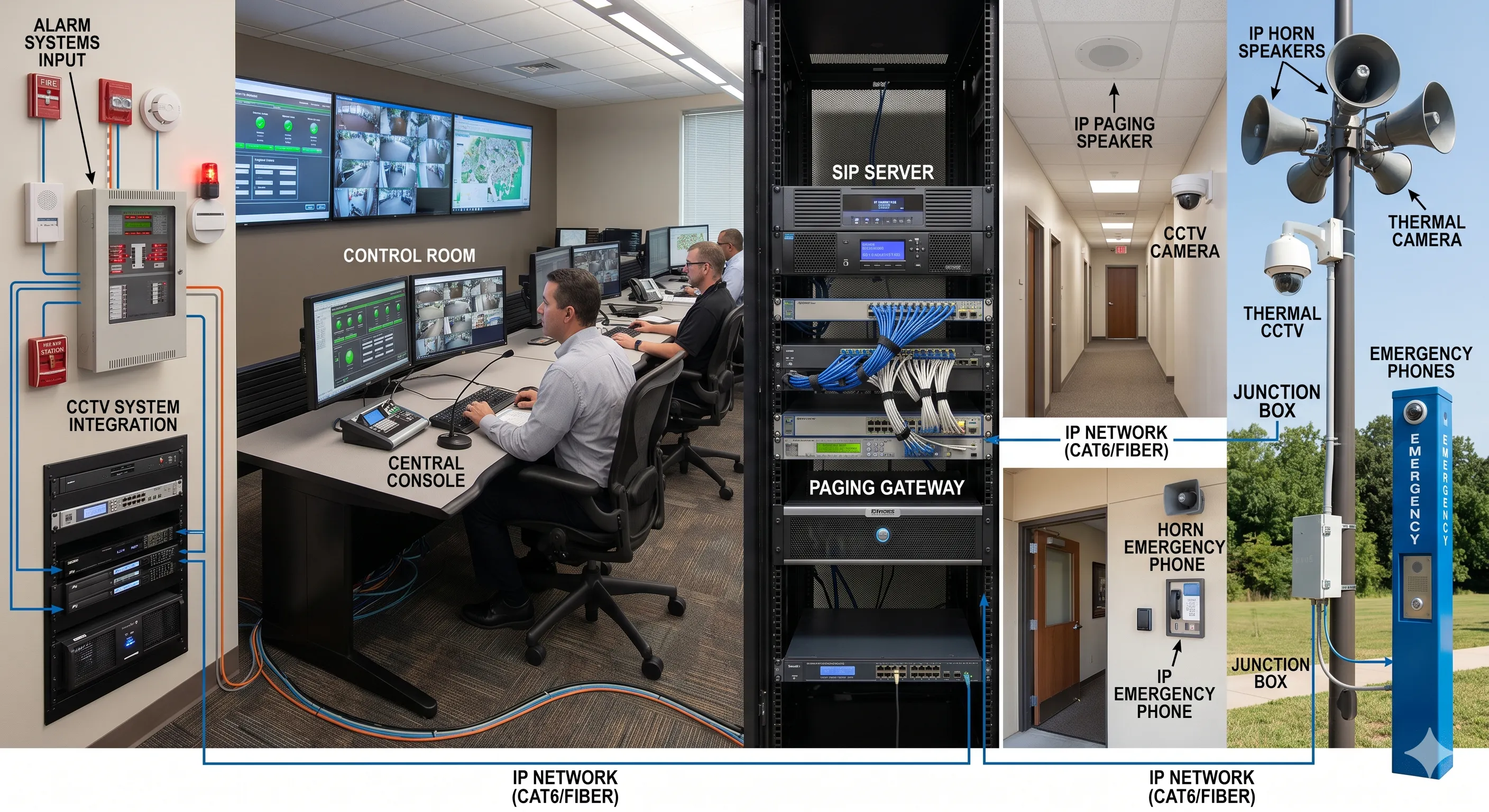
Paging gateways and network amplifiers: bridge communication control and an audio distribution system, subject to verified input/output and zone capabilities.
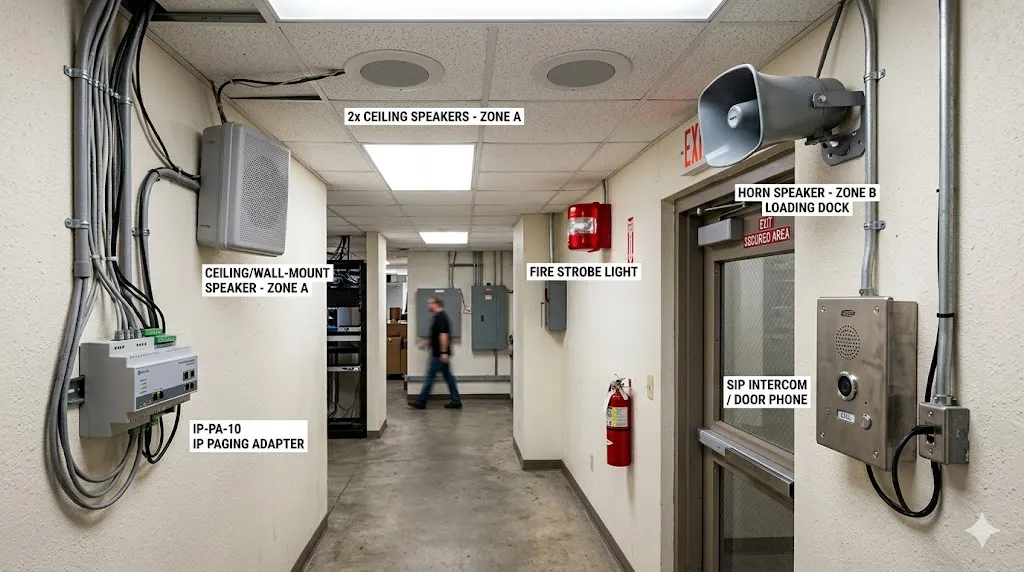
Before placing an order, obtain the manufacturer data relevant to each proposed location: power and audio ratings, environmental protection, temperature limits, installation method, wiring, power requirements and any required hazardous-area or life-safety approvals. Do not infer certification from an industrial-looking enclosure or an IP rating.
Step 5: Engineer Network, Power and Failure Behavior
For IP and SIP paging, a functioning demonstration on a single switch is not enough. The installed system must operate under the site's traffic, power and failure conditions. Map the communication path from an operator or alarm input through call control, media distribution and each speaker or amplifier zone.
Verify the audio and network path
Review the required switch ports, network segmentation, QoS policy, codec support, jitter handling and media routing. Where multicast is part of the approved architecture, confirm IGMP snooping and querier behavior, multicast scope across VLANs and support in all participating endpoints. Where multiple unicast streams are used, check server load and link capacity at the expected paging group size. A SIP call can register successfully and still fail to deliver acceptable audio because its media path is blocked or mismatched.
Calculate power resilience end to end
For PoE equipment, total the maximum specified power of the endpoints, allow for the switch's available power budget and verify that the installed cable route meets the network and device requirements. A UPS protecting only the SIP server will not keep announcements working if the required switches, paging controllers, amplifiers or gateway supplies lose power.
High-availability proposals should state which components are redundant and what happens to active and new announcements during failover. Validate loss of an uplink, a switch, a call-control service and a local power source against agreed recovery requirements. The presence of two servers alone does not prove a complete failover capability.
Step 6: Integrate Emergency Workflows and Check Compliance
Emergency announcements need a defined operating sequence, not merely an alarm input and a loudspeaker. Specify the event source, confirmation or automatic trigger policy, message selection, paging zone, priority, operator control and restoration to routine service. Alarm-to-voice integration may require software logic or certified interface equipment outside the paging endpoint itself.
Test priority, permissions and coordination
For a proposed incident workflow, establish who can initiate an all-site page, whether emergency announcements interrupt background music or routine messages, and how the control room sees faults or conflicting requests. If CCTV, industrial telephones, emergency call boxes or dispatch software are connected, verify each interface and its operator action separately. A network connection between systems does not guarantee that alarm messages, video views and voice calls are automatically coordinated.
Distinguish operational paging from regulated voice alarm
| Reference | Relevant subject | Procurement implication |
|---|---|---|
| IEC 60268-16 | Objective speech intelligibility measurement and prediction methods | Use the approved test method; obtain acceptance limits from the governing project and local requirements. |
| EN 50849 | Sound systems for certain emergency purposes | Check its actual scope; it excludes sound systems used for evacuation in case of fire emergency. |
| EN 54-16 / EN 54-24 | Voice alarm control and indicating equipment / loudspeakers in fire alarm applications | Check the required product conformity, system design and approvals where the relevant jurisdiction invokes them. |
| ISO 7240 series and local codes | Fire detection, alarm and associated sound-system requirements | Determine which parts, editions and national requirements actually apply to the project. |
IEC 60849 is a withdrawn legacy standard and should not be presented as a current universal compliance target. Neither SIP support nor a product's general-purpose paging capability establishes approval for fire evacuation. Project designers should confirm the authority having jurisdiction, the specified product documentation and the required acceptance process before final selection.
Step 7: Compare Lifecycle Cost and Commission the Installed System
Compare quotations over the expected service life rather than judging them by the unit price of a speaker or gateway. Equipment, cable routes, installation, licenses, commissioning, staff training, spare parts, maintenance and later zone changes all affect total cost of ownership. A low-price system that cannot be tested, updated or maintained efficiently may cost more over time.
Request evidence instead of feature claims
Ask the supplier for a zone schedule, endpoint list, network and power topology, confirmed system interfaces, mounting details, relevant certification documents and a commissioning plan. For each claimed feature, identify whether it is implemented in an endpoint, a gateway, an IP PBX, a paging controller or a third-party platform. Record firmware or software versions when the behavior depends on them.
Plan representative commissioning tests
The acceptance procedure should demonstrate a routine page to an individual zone, a permitted group page, an emergency override, a blocked unauthorized page, an alarm-triggered sequence, return to normal operation and any required two-way call. Test audio quality at designated listening positions, as well as the actual network and backup power scenarios agreed in the specification. Record the test conditions, results and outstanding issues; do not assume that a bench test demonstrates field coverage.
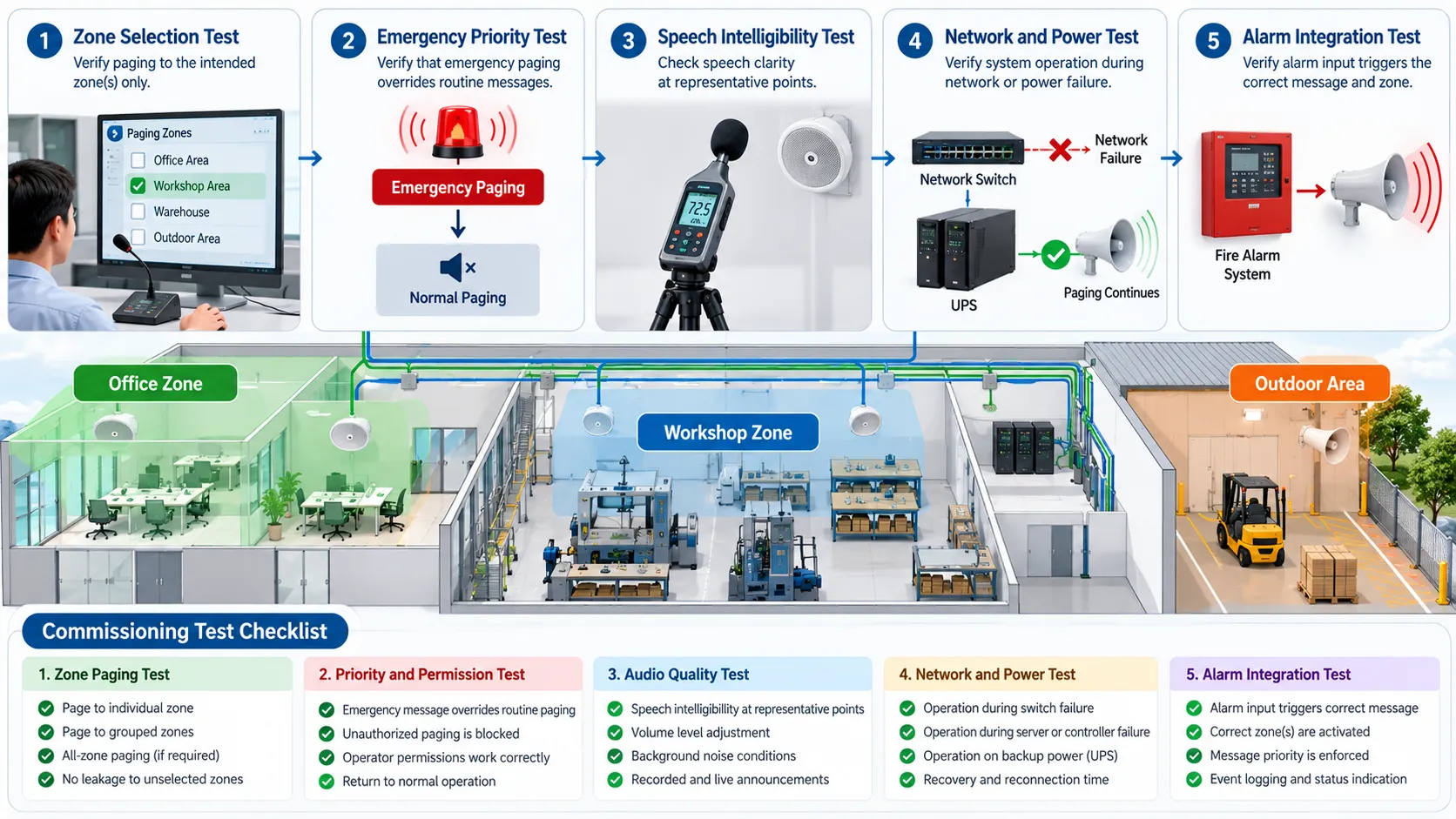
For large or safety-sensitive installations, commission each required zone under the approved operating conditions and confirm that all measured results satisfy the project-specific criteria. Training should cover who may change paging priorities, how to identify a failed endpoint and what fallback procedure operators follow if the primary paging path is unavailable.
Paging System Purchase Checklist
Use the following questions when comparing technically acceptable proposals. A compliant answer should be supported by a drawing, datasheet, configuration demonstration, test plan or other verifiable project document—not by a marketing description alone.
| Decision area | Question to put to the supplier | Evidence to request |
|---|---|---|
| Coverage and zones | Which locations receive which routine and emergency announcements? | Zone schedule, speaker layout and acoustic assessment plan |
| Speech clarity | What intelligibility target applies, and where will it be measured? | Governing acceptance criteria and measurement plan |
| Architecture | Why is analog, IP, SIP or hybrid paging appropriate here? | System topology and documented integration boundaries |
| Existing equipment | Which amplifiers, cables and speaker circuits can actually be retained? | Inspection record, interface details and load calculations |
| Control and priority | Who can page each zone, and what overrides routine traffic? | Permissions matrix and demonstration of priority handling |
| Network and power | What happens when a switch, controller, link or supply fails? | PoE/UPS plan, failure scenarios and recovery tests |
| Emergency approval | Which local rules apply, and which components require conformity evidence? | Applicable standards list, equipment documents and approval plan |
| Support and growth | How will future zones, maintenance and replacement be managed? | Capacity reserve, service plan and lifecycle cost estimate |
Common procurement mistakes include using one speaker type throughout the site, selecting amplifiers by nominal wattage alone, assuming that every SIP device can join every paging group, underestimating multicast or PoE requirements, treating an alarm relay as proof of complete emergency integration, and confusing commercial PA functionality with required life-safety approvals. Each of these can be prevented through explicit acceptance criteria.
For systems that need connected paging zones, compatible intercoms and control-room communication, review Becke Telcom's paging and intercom broadcasting solution and IP paging equipment. A useful project enquiry should specify the site layout, target zones, available telephone or PA equipment, required alarm interfaces and operating environment so the integration requirements can be evaluated against actual device capabilities.
FAQ
Can an existing analog PA system be upgraded without replacing every speaker?
Often, yes. Reuse depends on the condition and configuration of the installed speaker lines, amplifier load, required zone selection, signal levels and any applicable supervision rules. A compatible SIP or IP paging gateway may connect the old amplifier to a newer controller, but it does not automatically add functions the existing wiring cannot support.
Is a SIP paging system the same as an IP paging system?
Not exactly. IP paging describes the use of an IP network to distribute paging functions, while SIP defines a signaling method that can be used to establish calls to paging endpoints or gateways. A SIP paging solution is a type of IP-based paging design, but the actual audio distribution, group control and emergency functions depend on the participating equipment.
Does a paging system need STIPA testing?
It depends on the site's acoustic requirements, project specification and applicable safety regulations. Where speech intelligibility must be demonstrated objectively, the acceptance plan should identify the relevant test method, representative positions, operating noise and pass criteria. IEC 60268-16 supplies measurement methodology rather than one universal passing score.
How do buyers verify emergency paging reliability?
Test the complete route from alarm or authorized operator through message selection, call control, media delivery and the intended zones. Include interruption of routine paging, unauthorized access, selected equipment failures, power backup, restoration and event logging where specified. For regulated fire evacuation systems, also verify the required approvals, documentation and procedures under the governing local rules.
Technical references: